


About: Sayan Sircar (BE/MBA/CFA/FRM) has over 19 years of experience in goal-based investments, portfolio construction, risk/reward simulations and performance analysis. You can read more from Sayan here.
Summary
- ITR-2 filers with mutual fund redemptions must report STCG and LTCG separately, computed using the FIFO method
- Manually matching redemptions to purchases across multiple funds and folios is error-prone and time-consuming
- Moneyantra provides a free tool to compute exact capital gains from your CAS and export a ready-to-file Schedule 112A and Schedule CG
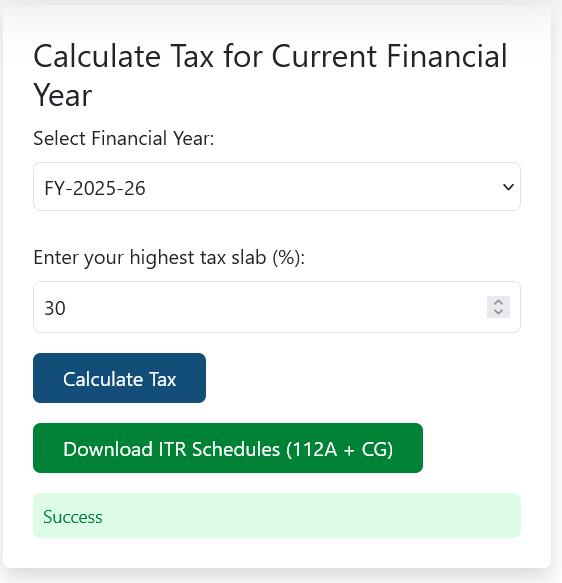
File ITR for Capital Gains in Seconds 👇
Upload CAS into Moneyantra & Calculate Tax →Last updated: 13-July-2026
What is needed to File Income Tax Return for Mutual Funds and ETFs?
To calculate mutual fund capital gains for your ITR-2, you must apply the First-In-First-Out (FIFO) method to all redemptions. This requires matching every sale to its earliest corresponding purchase across all folios. While this can be done manually in Excel, tools like Moneyantra automate this process by analysing your Consolidated Account Statement (CAS). The Moneyantra tool generates a Schedule 112A CSV for long-term equity gains and an Excel sheet for Schedule CG entries, ensuring your capital gains tax is computed and filed in seconds rather than hours.
Therefore, you just need your consolidated account statement (CAS) to file your ITR correctly for mutual funds capital gains tax if you are using Moneyantra. Also, for your convenience, you don’t need to perform any other calculations using Excel or use any other tool. When you get to the page to upload your CAS, you will get detailed instructions to generate the CAS.
The purpose of the files that Moneyantra produces is to exactly help you file your ITR in seconds. There is no extra information to confuse you nor do you need to perform any calculations. Also, Moneyantra uses the exact same language which appears in the Income Tax website so that you know which number goes where.
Why not use the MFCentral Capital Gains statement to file ITR?
There are two reasons for not using the MFCentral Capital Gains statement to file ITR
Reason 1 not to use MFCentral Capital Gains report
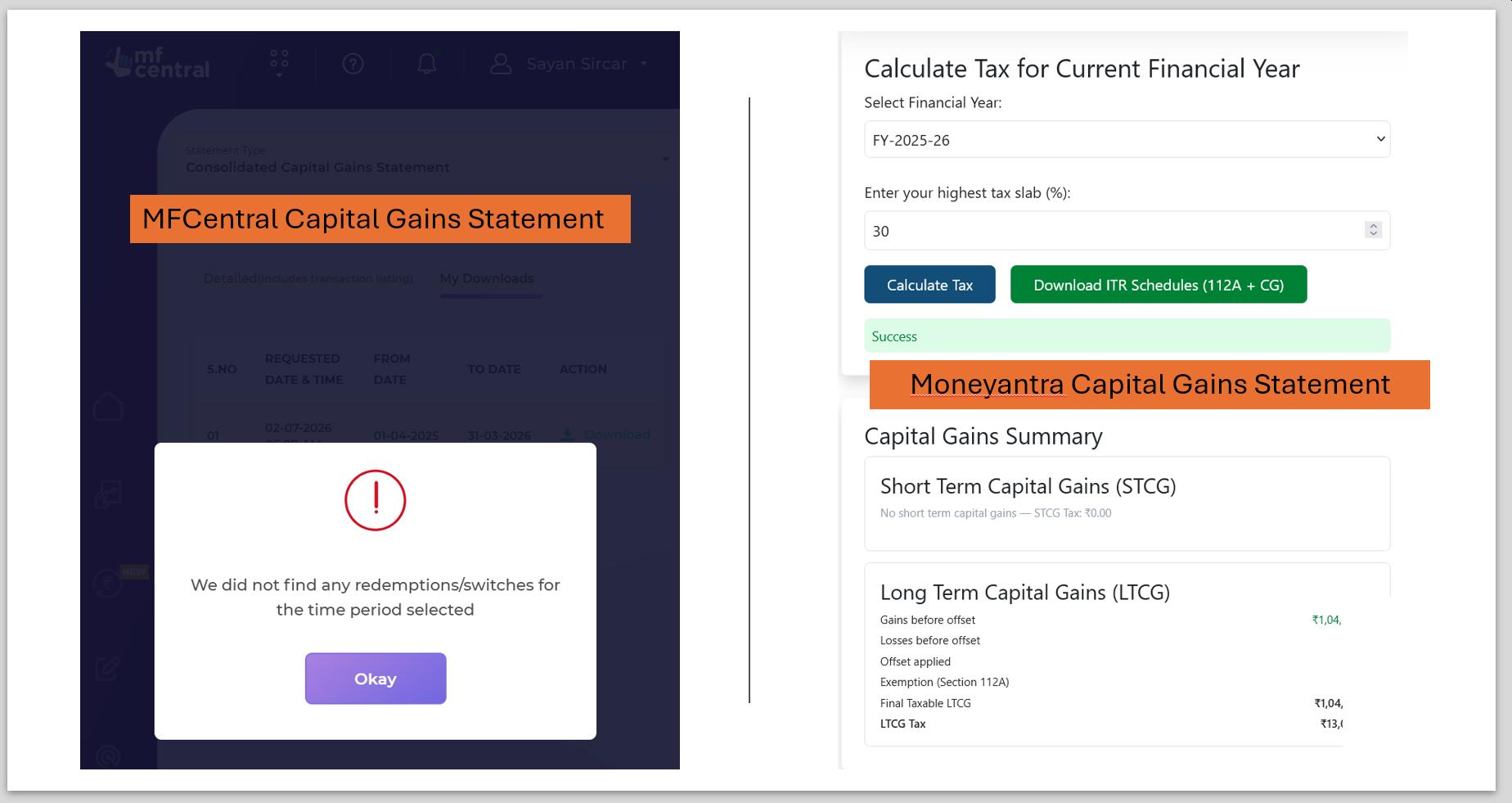
MFCentral data can be incomplete or incorrect. For example, for the author’s own capital gains statement, MFCentral shows no transactions in 2025-26 while Moneyantra has the right tax calculation:
Reason 2 not to use MFCentral Capital Gains report
The MFCentral Capital Gains report like that from CAMS and Karvy has the following information:
- Transaction-wise tables for all sale trades matching them to the respective buy trades
- Quarterly split of full-value of consideration, cost of acquisition and capital gains for equity-oriented and non-equity oriented
However, there are three problems here:
- Section 112A CSV (equity-oriented LTCG) is not provided with the columns you need. You need to create it using Excel using the tables in the capital gains report
- A lot of extraneous information is provided in the report that makes it difficult to locate the information that you need
- Language in the report does not match the ITR filing and you need to find you from other sources where to enter which number
In contrast, the Moneyantra Capital Gains report uses exact ITR filing language to help you find where to enter this data:
- ready-to-export CSV for Section 112A-eligible equity-oriented funds
- consolidated purchase and sale value numbers for the other funds
- quarterly split for only those rows in Table F under Schedule CG that you need to fill for mutual funds and ETFs
Why not get the Capital Gains Summary from CAMS and KFintech?
CAMs and KFintech do provide a capital gains summary. However, they provide the summary only for their own serviced funds, which means that you need to generate the reports separately from both CAMS and KFintech to cover all of your funds and then combine them manually by yourself.
However, their reports are incomplete since they do not provide the tax due but instead stop after providing just the capital gains amount. This is the snippet from the KFintech capital gains report for my own transactions:
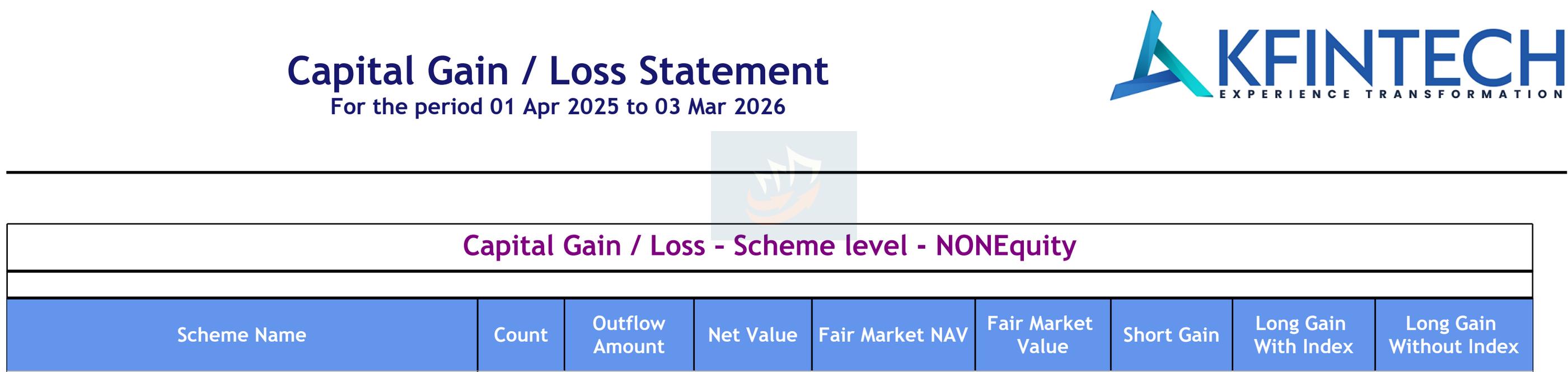
As you can see, this information does not actually tell you how much tax is due, how to apply Section 112A (LTCG ₹1.25 offset for eligible funds), and how to apply capital loss offsets.
The effort required to download the capital gains statement from either CAMS or KFintech is the same as the effort required to generate the complete consolidated account statement (CAS) from CAMS just once and using Moneyantra, get the complete tax report at one shot. Of course, Moneyantra offers much more than a capital gains report.
The same CAS that you will upload gives you:
- a daily updated dashboard of your holdings, asset allocation, investment, profit, loss and XIRR
- a way to calculate taxes on your mutual fund portfolio before you actually sell them via the Moneyantra capital gains tax simulation tool
- how to do tax harvesting to save ₹15,625 tax yearly by making use of the ₹1.25 lakhs LTCG exemption under Section 112A. We have a detailed article on this topic: How Indian Investors Can Legally Save ₹15,625 in LTCG Tax Every Year
- how to switch from regular funds to direct funds by knowing which funds to sell and the tax impact of selling
- get an automated mutual fund review report in PDF format into your mailbox in seconds, analysing your complete holdings and fund-level performance
How does Moneyantra Capital Gains ITR export compare against MFCentral, CAMS and Karvy?
For convenience, we have summarised the capital gain report from MFCentral, CAMS and Karvy vs. Moneyantra so that you can make an informed choice regarding which platform you wish to use:
| Source | Fund universe | Completeness | Detail | Ease of use |
|---|---|---|---|---|
| MFCentral | All | May not be complete |
Detailed / Complete |
❌ Low |
| CAMS | Only CAMS-serviced | CAMS-serviced transactions |
Detailed / Complete |
❌ Low |
| Karvy | Only Karvy-serviced | Karvy-serviced transactions |
Detailed / Complete |
❌ Low |
| Moneyantra | All | Yes, based on imported CAS |
Just enough / Complete |
✅ High |
How to File Capital Gains for Equity and Equity-Oriented Funds using Moneyantra?
How to file capital gains tax for equity LTCG in Schedule 112A?
You need to fill Schedule 112A for reporting long-term capital gains (LTCG) for equity-oriented mutual funds. For equity-oriented short-term capital gains (STCG), it is clubbed with the STCG filing in Schedule CG that we describe in the next section. For LTCG, Moneyantra generates the Comma Separated Values (CSV) file that you need to enter in the Schedule 112A section with the exact same columns that the Income Tax website requires:
- Share/Unit acquired (On or before / after 31st Jan 2018) (Col 1a)
- Share/Unit transferred (Before / On or after 23rd Jul 2024) (Col 1b)
- ISIN Code (Col 2)
- Name of the Share/Unit (Col 3)
- No. of Shares/Units (Col 4)
- Sale-price per Share/Unit (Col 5)
- Full Value of Consideration If shares/units are acquired on or before 31st January, 2018 (Total Sale Value) (4 * 5) or If shares/units are acquired after 31st January, 2018 - Please enter Full Value of Consideration (Col 6)
- Cost of acquisition without indexation (higher of 8 or 9 ) (Col 7)
- Cost of acquisition (Col 8)
- If the long term capital asset was acquired before 01.02.2018, Lower of 6 & 11 (Col 9)
- Fair Market Value per share/unit as on 31st January,2018 (Col 10)
- Total Fair Market Value as on 31st January, 2018 of capital asset as per section 55(2)(ac)- (4*10) (Col 11)
- Expenditure wholly and exclusively in connection with transfer (Col 12)
- Total deductions (7+12) (Col 13)
- Balance (6-13) Item 7(a) of LTCG Schedule of ITR2 (Col 14)
This is what the CSV export from Moneyantra looks like:

Once you upload the CSV file here, it takes care of
- grandfathered equity LTCG for fund units purchased before 31st Jan 2018 with individual rows
- a single consolidated row for fund units purchased after 31st Jan 2018
How to file capital gains tax for equity STCG in Schedule CG under Section A(I)?
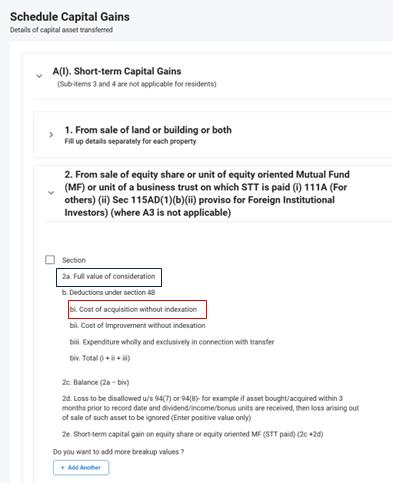
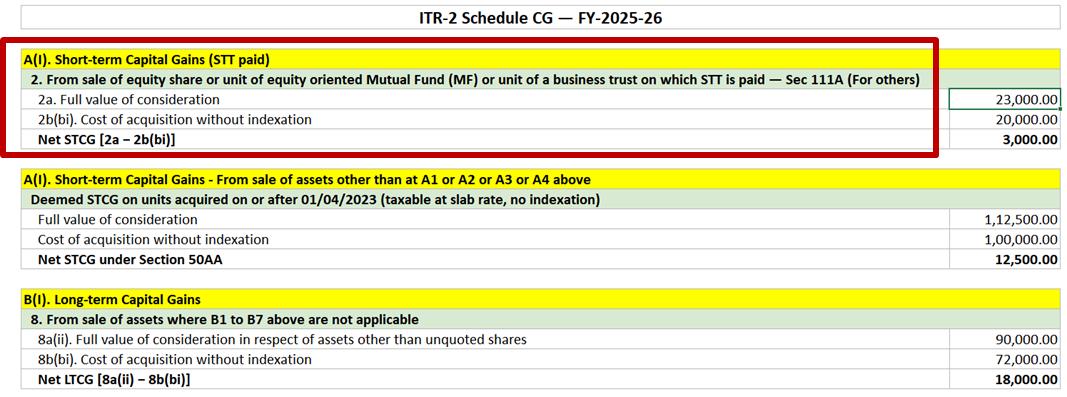
Enter equity STCG-related numbers in Schedule CG in the section “A(I). Short-term Capital Gains” under the header “2. From sale of equity share or unit of equity oriented Mutual Fund (MF) or unit of a business trust on which STT is paid (i) 111A (For others) (ii) Sec 115AD(1)(b)(ii) proviso for Foreign Institutional Investors) (where A3 is not applicable)”.
Just enter the two numbers for “2a. Full value of consideration” and “2b(bi). Cost of acquisition without indexation” from the Moneyantra Excel export into ITR and you will be done with filing STCG from equity -oriented mutual funds.
What you see in the income tax website:
What you see in the Moneyantra Excel export:
How to File Capital Gains for Debt-Oriented Mutual Funds using Moneyantra?
Which type of Capital Gains are to be Reported in Schedule CG?
You need to fill Schedule CG (Capital Gains) to capture capital gains for equity-oriented STCG and debt-oriented capital gains (both STCG and LTCG). Only for debt oriented funds purchased before 1st April 2023 and sold after 1st April 2025, there can be LTCG. For all other debt funds, their capital gains tax is considered as short term (STCG) and is taxed at slab rates. Moneyantra also calculates the LTCG for capital gains tax correctly for Hybrid, International or Gold/Silver funds with Indian equity allocation between 35-65%.
How to file capital gains tax for STCG under A(I) STCG for specified mutual funds Section 50AA using Moneyantra?
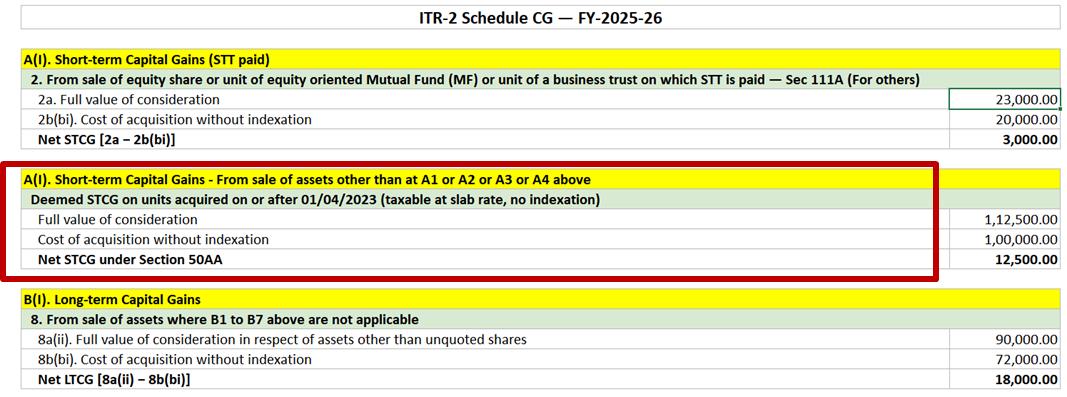
Specified Mutual Funds under Section 50AA deals with market-linked debentures and debt mutual funds that invest more than 65% of its total proceeds in debt and money market instruments (or a Fund of Funds investing 65% or more into such debt funds). This category includes all debt mutual funds, debt ETFs, and hybrid funds like conservative hybrid. These units are taxed at slab rates if purchased after 1st April 2023 and sold on or after 1st April 2025 i.e. FY 2025-26. Moneyantra gives you the correct tax calculation for specified mutual funds to be entered in Schedule CG under “A(I). Short-term Capital Gains”.
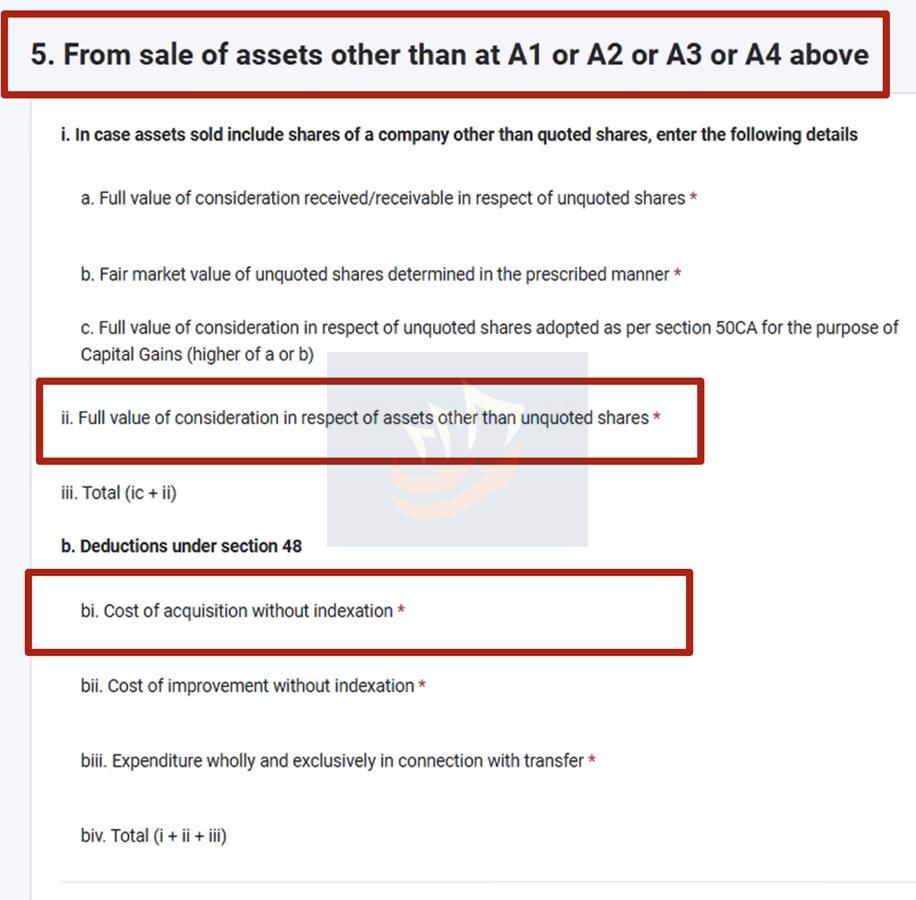
Enter specified fund STCG-related numbers in Schedule CG in the section “A(I). Short-term Capital Gains” under the header “5. From sale of assets other than at A1 or A2 or A3 or A4 above”.
Just enter the two numbers for “5 ii. Full value of consideration in respect of assets other than unquoted shares” and “5 bi. Cost of acquisition without indexation” from the Moneyantra Excel export into ITR and you will be done with filing STCG from specified mutual funds for FY 2025-26.
What you see in the income tax website:
What you see in the Moneyantra Excel export:
How to file long term capital gains in Schedule CG for non-equity mutual funds under B(I) LTCG using Moneyantra?
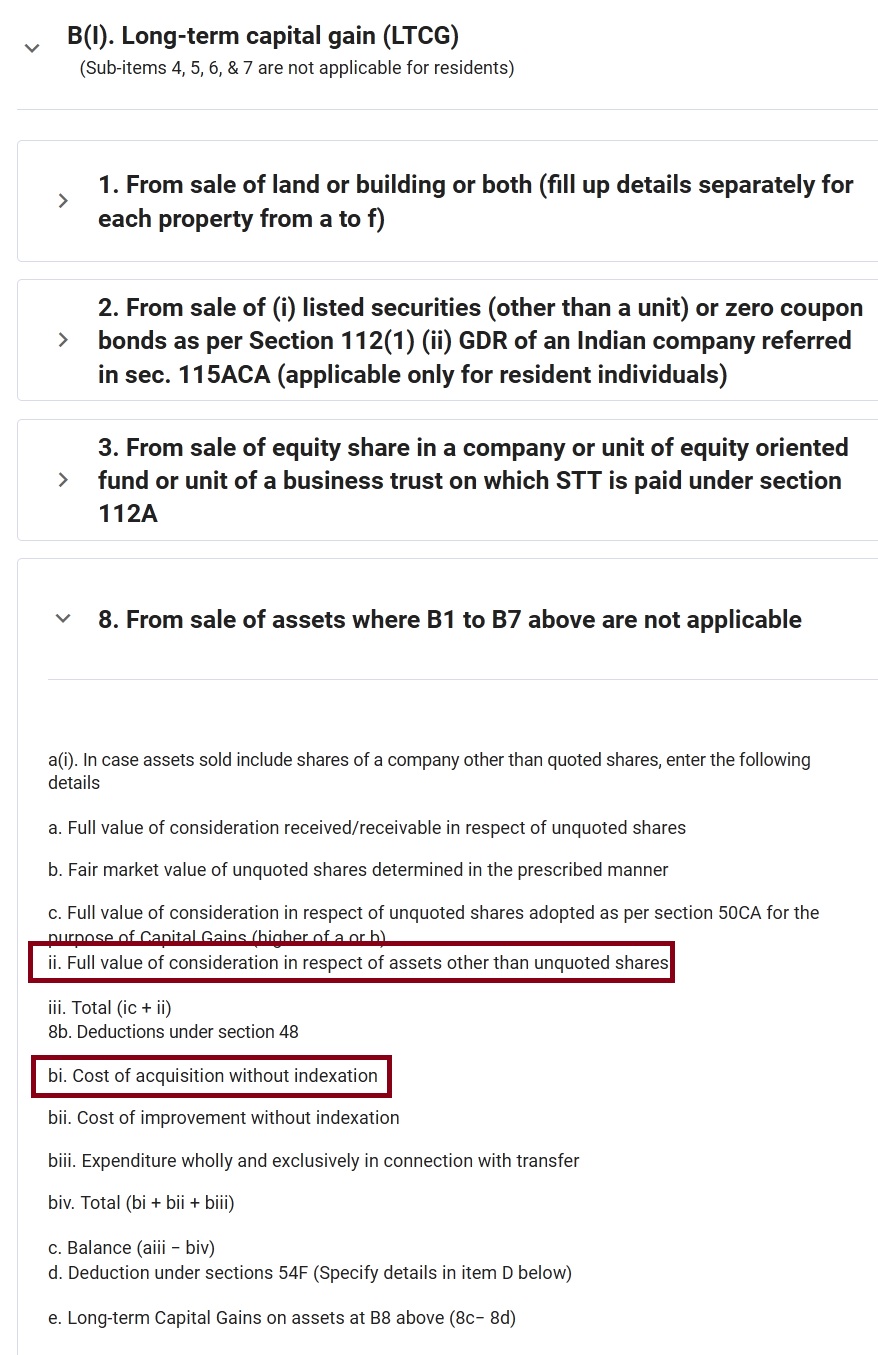
Long-term capital gains (LTCG) for non-equity mutual funds, e.g. international funds and gold/silver funds are reported in section “B(I). Long-term capital gain (LTCG)” under the header “8. From sale of assets where B1 to B7 above are not applicable”
What you see in the income tax website:
What you see in the Moneyantra Excel export:
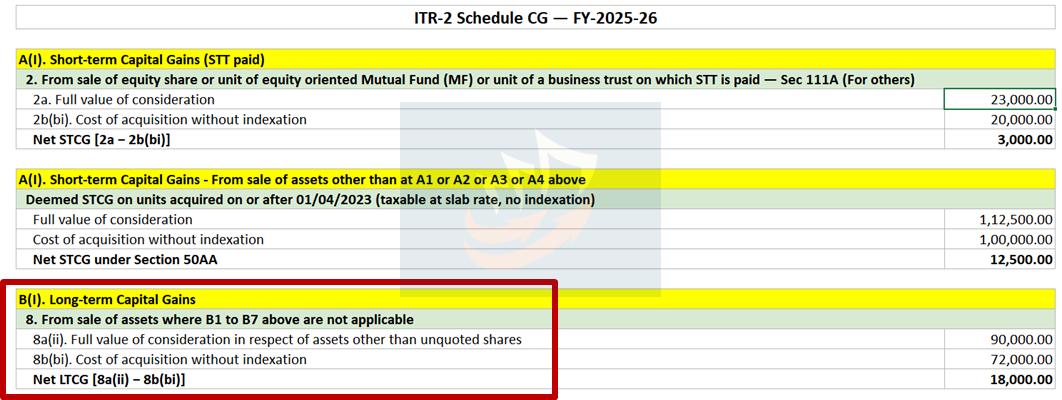
Just enter the two numbers for “8a(ii). Full value of consideration in respect of assets other than unquoted shares” and “8b(bi). Cost of acquisition without indexation” from the Moneyantra Excel export into ITR.
How to Fill Table F in Schedule CG for Quarter-wise Split of Capital Gains using Moneyantra?
Table F in Schedule CG is titled “F. Information about accrual/receipt of capital gain” and needs you to split the capital gains over the entire year within particular buckets like upto 15/06, 16/06 to 15/09 and so on. Moneyantra makes this filing of Table F in Schedule CG effortless by giving you the split of your mutual fund capital gains over the entire year to ensure that any interest on advance tax that is due over these periods can be correctly calculated else the ITR filing will fail. You need to just enter the numbers for from the Moneyantra Excel export into Table F for each of the three rows::
- 1 Short-term capital gains taxable at the rate of 20% Enter value from item 3iii of schedule BFLA, if any.
- 3 Short-term capital gains taxable at applicable rates Enter value from item 3v of schedule BFLA, if any
- 6 Long-term capital gains taxable at the rate of 12.5% Enter value from item 3vii of schedule BFLA, if any.
We only provide the rows you need for filing capital gains of Mutual funds and skip the rows that are not applicable to mutual funds to avoid confusion while filing.
What you see in the income tax website:
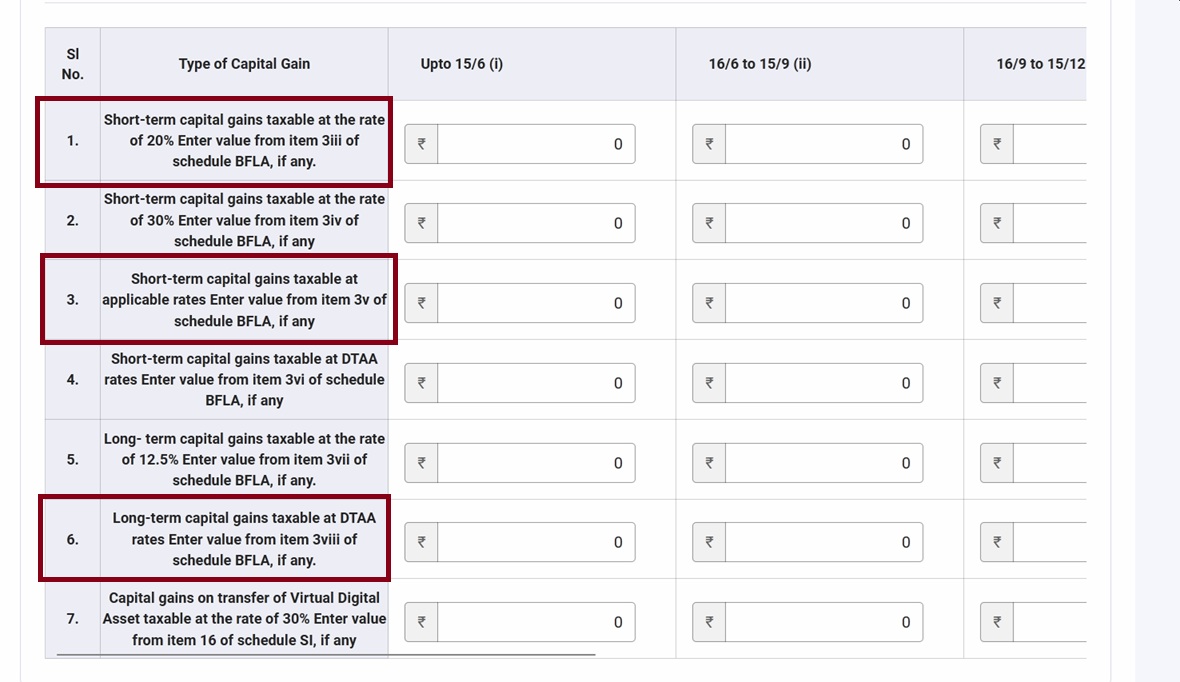
What you see in the Moneyantra Excel export:

After completing this section, you have completed the filing of capital gains tax for mutual funds.
Do you need the AIS while filing ITR2 using Moneyantra numbers?
It is a good practice to always reconcile the numbers in Annual Information Statement (AIS) for all the numbers in your ITR, not just Mutual Fund Capital gains. If the numbers match with the AIS, use the AIS numbers. If they don’t by considerable margin, please raise a case to rectify the AIS numbers.
So, don’t wait and instead:
Beta Feature Notice for ITR filing
This calculator is in beta and provides estimates based on data extracted from your Consolidated Account Statement (CAS) for Mutual Funds and ETFs. Results may differ from your actual tax liability due to incomplete CAS uploads, parsing limitations, or stale NAV data.
If you notice a discrepancy between these figures and your AIS (Annual Information Statement) or Form 26AS, please use your best judgement.
Found a discrepancy? Help us improve — email us at contact at moneyantra dot com.
Frequently Asked Questions (FAQs) on Filing Mutual Fund Capital Gains Tax
Which ITR form do I use to report mutual fund capital gains?
Individuals with capital gains from mutual funds must file ITR-2 (or ITR-3 if they also have business income). Schedule 112A is used specifically to report long-term capital gains (LTCG) from equity and equity-oriented mutual funds.
What method is used to calculate capital gains on mutual fund units to file taxes for FY2025-26 (AY2026-27)?
Indian tax rules mandate the First-In-First-Out (FIFO) method, where the earliest purchased units are considered sold first when computing gains on redemption. This rule is applicable to all tax filing years including FY 2025-26 (AY 2026-27).
What is the LTCG exemption limit for FY 2025-26?
Long-term capital gains on equity and equity-oriented mutual funds are exempt up to ₹1.25 lakh in a financial year, with gains above this threshold taxed at 12.5%. This rule comes under Schedule 112A.
How is short-term capital gains tax on mutual funds calculated?
Units held for 12 months or less in equity and equity-oriented funds are treated as short-term capital gains and taxed at a flat 20% rate (plus applicable surcharge and cess), as per the applicable rules for the financial year.
How does Moneyantra help calculate and file my mutual fund capital gains?
Moneyantra processes your Consolidated Account Statement (CAS) from CAMS or KFintech, applies FIFO matching across all funds and folios, and generates a Schedule 112A CSV formatted for direct entry into ITR-2 for equity-oriented funds. For all other funds, Moneyantra gives you an Excel sheet with both short-term (STCG) and long-term (LTCG) sale and buy amounts that you can enter into Schedule CG.
Can I use one CAS file if my mutual funds are held jointly or across multiple PANs?
Yes, Moneyantra supports multi-PAN CAS files and automatically separates and attributes capital gains to each individual PAN, generating a separate Schedule 112A and Schedule CG export for each.
Do I need to report capital gains even if I reinvested the redemption amount?
Yes, redemptions are taxable events regardless of whether the proceeds are reinvested. Switches between funds are also treated as redemptions followed by fresh purchases for tax purposes.
What documents do I need before filing ITR2 for Capital Gains?
You need your Consolidated Account Statement (CAS) covering the full financial year, which can be downloaded from the CAMS or KFintech website using your registered PAN and email.
What is the deadline for filing income tax return for FY2025-26 for mutual fund capital gains?
You should file your income tax return on or before 31st July 2026. Tools like Moneyantra.com make it easy and quick to file your capital gains for mutual funds.